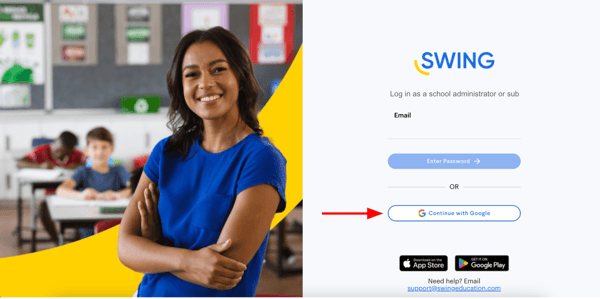
Tips for logging into your Swing Account
Follow these steps to troubleshoot issues with logins to Swing

Log in using Google
Having trouble logging in using Google? Try these steps:
Click "Continue with Google"

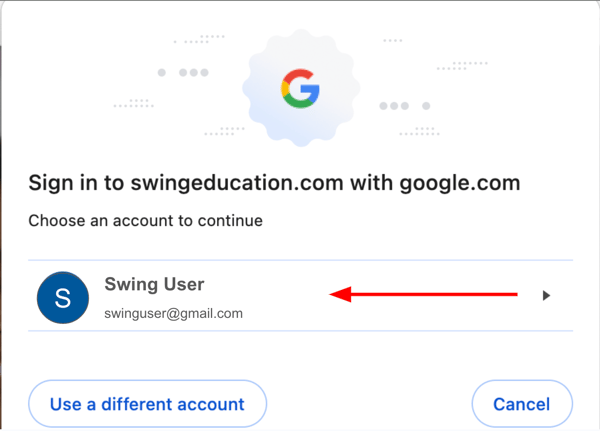
Choose the account you use for Swing on the Google pop-up
Don't see a pop-up? Minimize your browser window as it may be hidden.
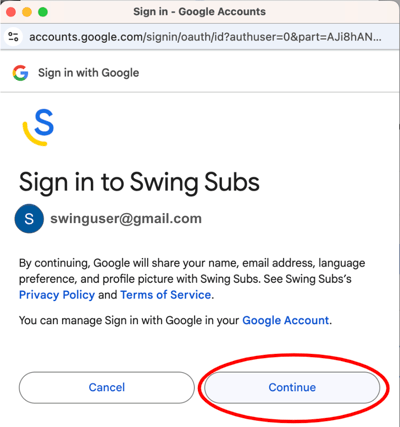
Click "Continue"
Don't see a pop-up? Minimize your browser window as it may be hidden.
Extra Troubleshooting
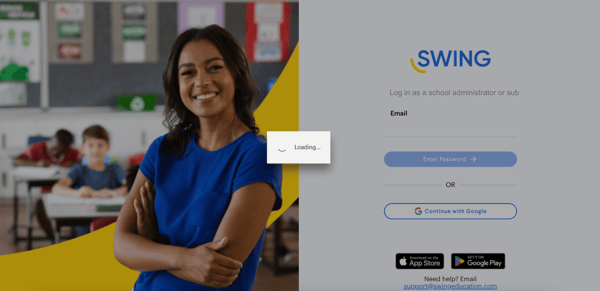
- If you see a loading spinner, your pop-up may be hidden. Minimize your browser window and look for a Google pop-up.
- If you still need help, reach out to support@swingeducation.com with a screen recording of your attempt to log in. This helps us more efficiently support you.
Log in using email and password
Having trouble logging in using Google? Try these steps:
- Make sure you're using the email you registered your Swing account with.
- Make sure your password is correct
- Passwords are case sensitive–double-check any upper or lower case letters.
- If your password is not working, click “Forgot password?” to reset.
Extra Troubleshooting
- If an email and password is not working, try to log in with Google instead. If your email is a Google account, you’ll need to follow the instructions above.
- If you still need help, reach out to support@swingeducation.com with a screen recording of your attempt to log in. This helps us more efficiently support you.