.png?width=200&height=60&name=LOGO_SWING%20EDU_YEL_BLU-200px%20(1).png "LOGO_SWING EDU_YEL_BLU-200px (1)")

Swing Education has partnered with Branch to pay you faster


Flexible pay at your fingertips

Looking for your workplace passcocde? It's SwingHero
If you want to learn more about Branch, check out our FAQs.
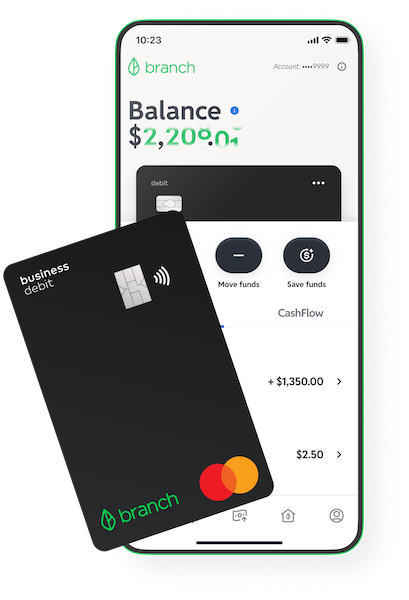
Introducing the Branch App
With the Branch App, you’ll get access to fast and flexible digital payouts at no cost.
After all, it’s your money—you’ve earned it.
|
|
|
|
|
|
|
|
|
|

Looking for the workplace passcode? It's SwingHero
Already have a personal bank account?
Link your preferred debit card and get your earnings right to your existing bank account for a fee (min. $2 or 2% of payout).

*Branch is not a bank. Banking services provided by Evolve Bank & Trust, Member FDIC. FDIC insurance only applies for eligible accounts should the bank holding your funds fail. The Branch Mastercard Debit Card is issued by Evolve Bank & Trust pursuant to a license from Mastercard and may be used everywhere Mastercard debit cards are accepted.
**A $2 fee will apply per Allpoint ATM transaction after 8 transactions until the next month.
What is Branch?
Branch is not a bank. Branch is a dynamic financial technology company that works with a partner bank to provide secure and innovative banking services, including a digital business bank account and debit card*. Branch is a dynamic financial technology company that works in partnership with Evolve Bank & Trust, Member FDIC, to provide secure and innovative banking services, including a digital business bank account and debit card. We’ve partnered with Branch to pay out earnings via the Branch App or directly to an existing bank account via a debit card.
How do I sign up?
Swing Education partners with Branch to offer two options to get paid daily: free through the Branch App or via a debit card to your existing bank account for a small fee. Choose your preferred method HERE. Use workplace passcode “SwingHero” if prompted.
How do I become eligible to get access to faster payments through the Branch App at Swing?
You are eligible to get access to faster payments for your work as a substitute teacher through Swing by earning Swing Hero status. Fast payments through the Branch App are a benefit to high-performing and reliable subs like you!
What happens it I lose Swing Hero status? Will I lose access to my Branch Wallet through Swing?
No, once you have qualified to get access to faster payments through the Branch App, you will not lose this benefit even if your Swing Hero status changes.
How do I order my Branch business debit Mastercard in the Branch App?
You can order your personalized business debit card by tapping Order Card once you completed your registration. The card should arrive at your home address within 8-12 business days. While you wait for the physical card to arrive you can use your card digitally with Apple Pay or Google Pay.
How do I add my business debit card to Apple Pay or Google Pay?
Adding your Branch business debit card to Apple Pay or Google Pay will allow you to make contactless purchases using your phone. To enable this feature, tap the 3 dots on the top right corner of the card displayed to open the Card Controls menu, then tap Add to Apple Wallet or Add to Google Pay. Follow the instructions from there and verify using the phone number on your account.
Can I add other deposits to my Branch account?
Yes! Branch provides an FDIC-insured business bank account from Evolve Bank & Trust, so you can set up direct deposits from other companies using your account and routing number, which are displayed in the app after signing up.
How do I pay a bill using my Branch account?
You can pay your bills online by providing your Branch debit card number to your biller. If your biller does not support getting paid via debit card, then you may provide your Branch account and routing number to them.
How do rewards work?
Earn cashback rewards on everyday spending with your Branch debit card at participating merchants ranging from local restaurants to online retailers. You’ll automatically collect cashback rewards after every purchase—watch your savings pile up month-long and your rewards will be redeemed to your account at the end of each month. Go to the Rewards tab in the Branch App to find participating merchants and retailers.
What is Savings Goal?
With Savings Goal, Branch users can set aside funds for a specific goal and track their progress toward achieving it. Start taking control of your financial future: put your hard-earned cash toward an emergency fund, a vacation, or whatever else your heart desires. Move money based on your preferred schedule: automate transfers between your primary balance and your Savings Goal with auto-contributions or manually contribute to your goal whenever it works for you.
What is Greenhouse?
Greenhouse is a curated marketplace powered by MoneyLion where you can browse financial products and services tailored to meet your unique financial needs. From personal loans to high-yield savings accounts, you’ll be able to find fresh ways to make the most out of your money.
Get started with Greenhouse:
- Go to the Greenhouse tab in the Branch App to browse the latest financial products and services.
- Click the product you're interested in, whether it be a savings account, personal loan, or refinancing options.
- Review the information provided by Branch
- Continue to an external platform to provide basic information and review your selection.
New financial products and services will populate on an ongoing basis, so be sure to check back in to see what's new.
Which ATMs can I use for free?
With Branch, you receive access to 8 free ATM transactions per month at 55,000+ ATMs in the Allpoint Network. A $2 fee will apply per ATM transaction after 8 transactions until the next month. Allpoint ATMs are conveniently found in popular retailers — places you already know, love and shop every day. You can find your closest Allpoint ATM through the Move Funds menu in the app, or by clicking here.
How do I transfer funds from my Branch account to an external account?
Click the Move Funds option in the wallet tab to transfer funds from Branch to an external account. You can transfer funds instantly for a small fee by selecting the Debit card option, or you can transfer funds for free using the Another bank option. Free transfers process via ACH and take 3-5 business days.
What happens if I lose my Branch Business Card?
If you believe your card is lost or stolen, we urge you to first lock the card. Open your Branch App, tap the 3 dots on the upper right corner of the black debit card and tap Lock Card. From there, you can select to order a replacement card. A new personalized card will be shipped to your home address within 8-12 business days.
Have other questions?
Check out the Branch Help Center for further FAQs or contact our support team in-app through the Account Tab of your Branch App.